Research Pedestal
The pedestal is where progression actually happens. A player puts a
Research Scroll into it, the research runs for the stage's
research_time, and the stage unlocks when it finishes.
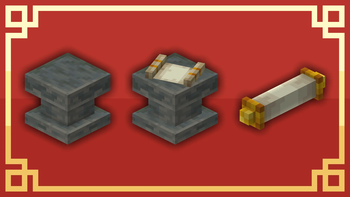
While research is running the pedestal emits light (level 13) and shows progress in its GUI. Progress is stored in the scroll itself, not in the block, so a player can take the scroll out, walk away, and carry on later — or finish at a different pedestal entirely.
Starting and pausing
Research does not begin on its own. A scroll sitting in a pedestal with everything in order still waits for the Start button; while a run is going the same button reads Pause, and pausing is always allowed.
Nothing is lost by a pause, an interruption or an unmet condition. Progress is kept and the run simply stops advancing — that is also what happens if a dependency stops being met halfway, or if the scroll is moved to a pedestal of the wrong tier.
Handing in dependencies
When a stage has dependencies, the pedestal GUI expands to show a side panel listing every condition and whether it is met. Deposit-based conditions — items, item tags, XP levels — are fulfilled by putting them straight into the pedestal, a few at a time if need be. The counter on each entry shows how far along it is. Handing items in by hand counts the booster's cost reduction the same way the deposit slot does.
A stage can also be blocked by its logic, or be cheaper or costlier while some other stage is unlocked. The pedestal shows a red box with the reason and keeps the start button disabled while a stage is blocked, and a line with what is cheaper and why while a cost block applies.
Tiers
There are four pedestals, so a pack can put late-game research behind a more elaborate setup:
| Tier | Block id | |
|---|---|---|
| I | historystages:research_pedestal | Single block. |
| II | historystages:research_pedestal_tier_2 | Single block. |
| III | historystages:research_pedestal_tier_3 | Wider, multi-block. |
| IV | historystages:research_pedestal_tier_4 | The largest. |
Each tier is its own block. A higher tier does not require dismantling a lower one — they are separate placements, and the pedestal a scroll sits in decides both the tier gate and which boosters count.
Tier gating per stage
Two optional fields in the stage file restrict where it may be researched:
| Field | Type | Default | |
|---|---|---|---|
min_pedestal_tier | Integer 1–4 | 1 | The lowest tier that may research this stage. |
pedestal_tier_mode | String | "min" | "min" — this tier and higher. "exact" — only this tier. |
A scroll placed in a pedestal that does not match gets a tier-mismatch warning in the GUI, and research simply does not start.
Whether players can see the requirement before trying is showScrollTierTooltip in
[visuals], on by default.
Boosters
A booster is an ordinary block placed directly underneath an active pedestal. It changes the research running on top of it in two ways:
- Speed reduction shortens the research time. Capped at 90%, so research can run at most 10× faster.
- Cost reduction lowers the count on item-deposit dependencies. It is locked into the scroll on the first deposit, so it cannot be gamed by swapping boosters halfway through.
Boosters are declared in
researchBoosters, one comma-separated string
per entry:
"block_id, speed_percent, cost_percent, tier, mode"
| Part | Values |
|---|---|
speed_percent / cost_percent | 0–90. |
tier | The lowest pedestal tier the booster works under, 1–4. |
mode | min (this tier and higher) or exact (only this tier). |
researchBoosters = [
    "minecraft:redstone_block, 25, 0, 1, min",
    "minecraft:diamond_block, 50, 25, 2, min",
    "minecraft:beacon, 75, 50, 4, exact"
]
The list is also editable in-game through the Config Editor, so booster blocks and their tier requirements can be set up without touching the file.
Which block gets checked
Tier I and II pedestals check the single block directly underneath.
Tier III and IV are multi-block structures, so the mod scans both positions beneath them — the
foot block and the head block — and applies only the strongest match. Speed reduction wins;
cost reduction breaks a tie; the foot block wins a complete tie. A booster whose tier / mode
does not match the pedestal it is under is ignored entirely rather than partially applied.
Boosters are registered as their own JEI/EMI recipe category, so players can look up which blocks
help and by how much. The hover text on the block itself is showBoosterTooltips in
[visuals].
Comparator output
The pedestal drives a comparator, so redstone can react to research:
| Signal | Meaning |
|---|---|
0 | No scroll, or research has not started. |
1–14 | In progress, scaling linearly. |
15 | Complete. |
The signal jumps to 1 the moment research begins and rises continuously to 15. That is enough to
drive a progress display, trigger a sound, or hold a door shut until research finishes.
On Tier III and IV pedestals, the foot block and the head block emit the same signal.
Getting pedestals into the pack
There are no recipes for the pedestals by default. → Obtaining Scrolls & Pedestals
See also
- Research Scrolls — the item that goes in the pedestal.
- Dependencies — what the side panel is listing.
- Stage Modes — the modes that skip the pedestal entirely.