Research Scrolls
A scroll is the item that carries a stage into the pedestal. It also carries the research progress, so it is the scroll rather than the block that remembers how far along a player is.
| Scroll | What it is |
|---|---|
| Stage Scroll | Bound to one stage id. Researching it unlocks that stage. |
| Individual Scroll | Bound to one player by UUID. Only that player can research it; the tooltip and the pedestal GUI show the owner's name, and the slot is greyed out for everybody else. |
| Creative Scroll | Unlocks every stage at once. For testing and creative mode. |
What happens when research finishes
defaultScrollCompletion in
[research] decides, and a stage can override
it with its own scroll_completion:
| Value | Result |
|---|---|
consume (default) | The scroll is used up. |
replace | A fresh scroll for the same stage appears in the pedestal. |
open | An open scroll is left behind as a keepsake. |
The scroll tooltip
The tooltip is fully configurable under
[scroll_tooltip] in visual.toml, and
through a dedicated screen in the Config Editor.
The pipe-delimited strings below are not meant to be typed. The Config Editor has a screen for this one: sections as rows you drag into order, with their switches and colours next to them and a live preview of the finished tooltip. The format is documented here because it is what that screen writes, and because a server owner may end up reading it in the file.
Each entry in lines is a pipe-delimited string:
id|enabled|spacerBefore|style|text
| Part | Meaning |
|---|---|
id | Which section the line controls. |
enabled | Whether the section appears at all. |
spacerBefore | Whether a blank line goes in front of it. |
style | +-joined Minecraft formatting names, e.g. gray+italic. Empty uses the built-in colour. |
text | Custom text, or empty for the built-in translation. |
The item name is always first and cannot be moved. The sections that can be reordered are
individual_badge, owner, info1, info2, tier and dependencies.
The dependency block is built from sub-templates of its own — dep.header, dep.group_header,
dep.item, dep.stage, dep.individual, dep.xp, dep.separator — plus icon and colour options
(dep.icon_fulfilled, dep.icon_open, dep.icon_unknown, dep.color_fulfilled,
dep.color_open).
Unknown ids are ignored, and a known id missing from the list falls back to its default, so a config keeps working when later versions add sections.
dep.group_header sits above a group and says how that group's own entries combine — All of
or One of. dep.separator sits between groups and always says AND, because groups are always
joined by AND.
They used to be one line, which printed one group's logic in the gap before the next and made an OR group look like it applied to everything after it. → Dependencies
hideFulfilledDependencies drops lines the player has already met, leaving only what is
outstanding. Visibility is worked out before a switched-off line disappears, so a met entry whose
line is hidden still settles its OR group.
The open scroll document
A researched scroll — or an already-unlocked one that a player opens — becomes an open scroll: a book-style GUI describing the stage in full.
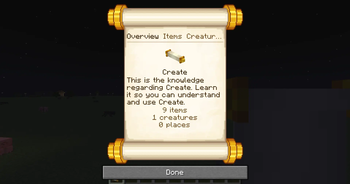
It has an overview page plus three chapters: items, creatures and world. Along the top
they are marked with small ink icons, the chapter's name on hover; tabStyle = "words" in
[open_scroll] writes the names out instead. Locked entries
are drawn as silhouettes with a redacted name by default (lockedDisplay = "obscured"), or normally
with "visible".
The world chapter is the catch-all for everything that is neither an item nor a creature:
| Group | Contents |
|---|---|
| Dimensions, Structures, Biomes | As listed in the stage. |
| Zones | By name. An unnamed zone has nothing to show and is left out; the same name in two worlds appears once. |
| Fluids | Under their real in-game name rather than their registry id. |
| Merchant Professions | The profession, with the gated levels named. |
| Trade Offers | Single offers. Merchant, price and levels are in the tooltip; an offer applying to every merchant says so. |
| Merchant Levels | Levels gated across every profession at once. |
A group with nothing in it gets no heading at all.
Recipes, mods, mod exceptions and addon categories are deliberately absent. A scroll is a player-facing description of what a stage holds back, and those four are authoring concepts rather than things a player can point at.
Chapters, the overview layout, search, entry ids, sort order and the page ink colours are all
configured under [open_scroll] in
visual.toml. How far the world behind the page is dimmed is openScrollBackdrop in
[visuals].
Reading from a lectern
An open scroll can be put into a lectern like a book, and right-clicking the lectern opens the same document straight from the block — handy for library or archive builds. Locks still apply: a lectern inside a locked area cannot be read from until that area opens.
Resealing
An open scroll can be crafted back into a sealed Research Scroll through a reseal_scroll recipe,
controlled by enableScrollResealing in
[research].
Crafting follows the setting immediately, but JEI and EMI build their recipe lists at startup — so the entry only appears or disappears in the recipe browser after a restart.
Scroll shelves
A chiseled bookshelf for research scrolls, in eleven wood types from oak to warped. It holds six scrolls:
- Click a slot with a scroll to put it in, with an empty hand to take it out.
- A comparator reads the slot that was used last; hoppers can fill and empty it.
- Jade names the scroll in the slot you are looking at.
Research and creative scrolls fit, open scrolls do not. The item tag
historystages:scroll_shelf_scrolls decides what fits, so a pack can add more.
Crafted like the chiseled bookshelf, planks and slabs of one wood type, with paper in the middle so the two recipes do not collide. Unlike the vanilla shelf it always drops itself, with or without Silk Touch.
Giving a scroll by command
For testing, or as a quest reward:
/give @s historystages:research_scroll[minecraft:custom_data={StageResearch:"bronze_age"}]
Replace bronze_age with the stage id. On versions before 1.20.5 the older NBT syntax applies
instead:
/give @s historystages:research_scroll{StageResearch:"bronze_age"}
See also
- Obtaining Scrolls & Pedestals — real recipes for KubeJS, CraftTweaker, datapacks and FTB Quests.
- Research Pedestal — where the scroll goes.
- visual.toml — the full settings blocks.